
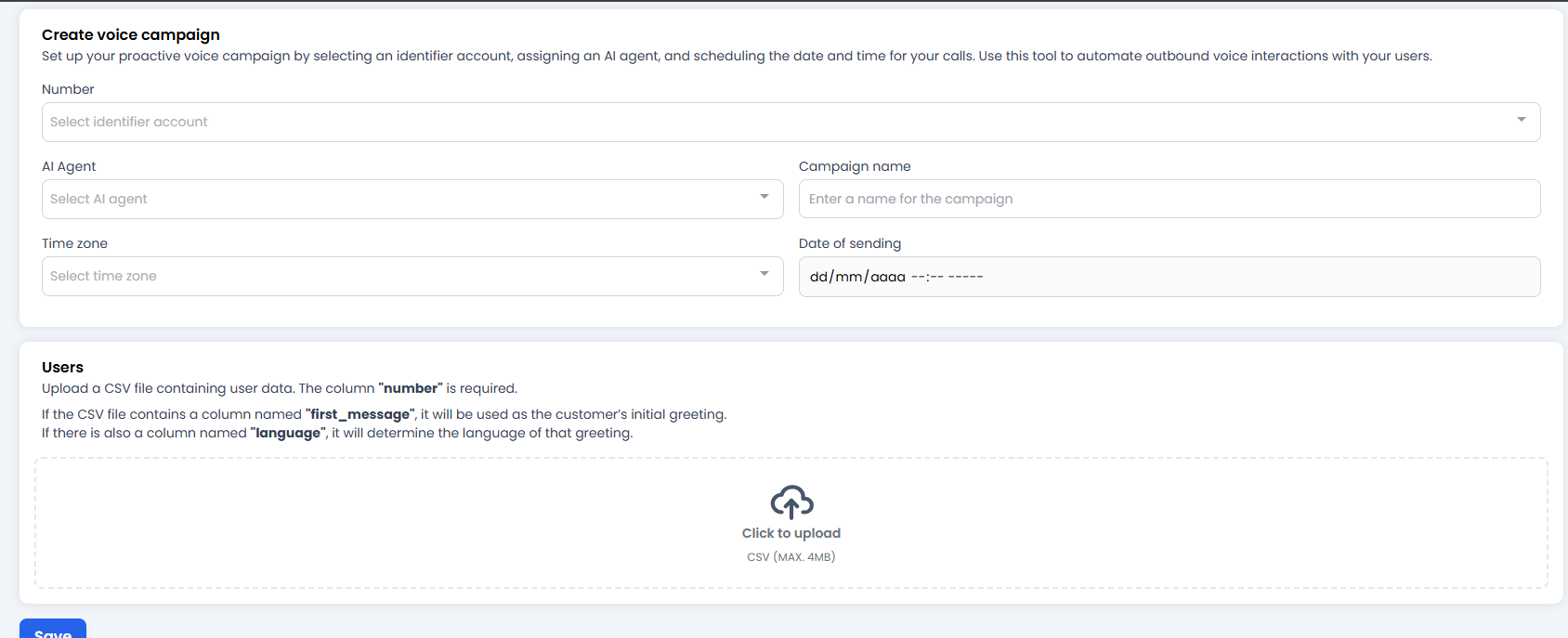
📝 1. Call Identity
Define who is calling and who is speaking:- Number: Choose the phone number that will appear on the customer’s screen. (Make sure it is a valid voice number configured in the Voice module.)
-
AI Agent: The most important field. Select which “personality” will make the call.
- Tip: Make sure this Agent has a natural-sounding voice configured in its Behaviour, along with the correct instructions on how to introduce itself.
-
Campaign name: Give it a name to stay organised (e.g.
Invoice_Collection_November).
⏰ 2. Scheduling
Calls are intrusive. Getting this wrong can annoy a lot of people.- Time Zone: Select your customers’ time zone, not yours. If you’re calling Mexico from Spain, set the zone to
Mexico Cityso you don’t wake them up in the middle of the night. - Date of sending: The date and time when the call campaign will start.
👥 3. The Audience and the “Magic Trick” (CSV)
This is where you upload your contact list. But pay close attention to the text in the image, because this is where the magic of personalisation happens. Your CSV file must contain specific columns:-
number(Mandatory): The customer’s phone number with country code. Without this, there is no call. -
first_message(The Superpower 🦸♂️):- If you add this column, the bot will ignore its default greeting and read exactly what you put here.
- Example in the spreadsheet: “Hello Carlos, I’m calling from Lovi to confirm your appointment tomorrow.”
- This allows the bot to start the conversation using the customer’s real name, which dramatically increases the success rate.
-
language(Polyglot 🌍):- If you add this column, you can force the language of that greeting. Useful if, within the same campaign, you have customers who speak English (
en) and Spanish (es).
- If you add this column, you can force the language of that greeting. Useful if, within the same campaign, you have customers who speak English (
🚀 Launch!
When you click Save:- The system validates your CSV.
- The campaign is set to
Ready. - At the scheduled time, the bot will start dialling numbers one after another.